Kubernetes Service Has No Endpoints: 2 Causes and Fixes
Your Kubernetes Service has no endpoints, so traffic goes nowhere. Learn the two usual causes, the commands to confirm each one, and the fix.
When a Kubernetes Service has no endpoints, no ready Pod matches its selector, so traffic has nowhere to go. In practice it's almost always one of two causes: the selector doesn't match the Pod labels, or the Pods exist but aren't Ready. You can tell which one you have in under a minute.
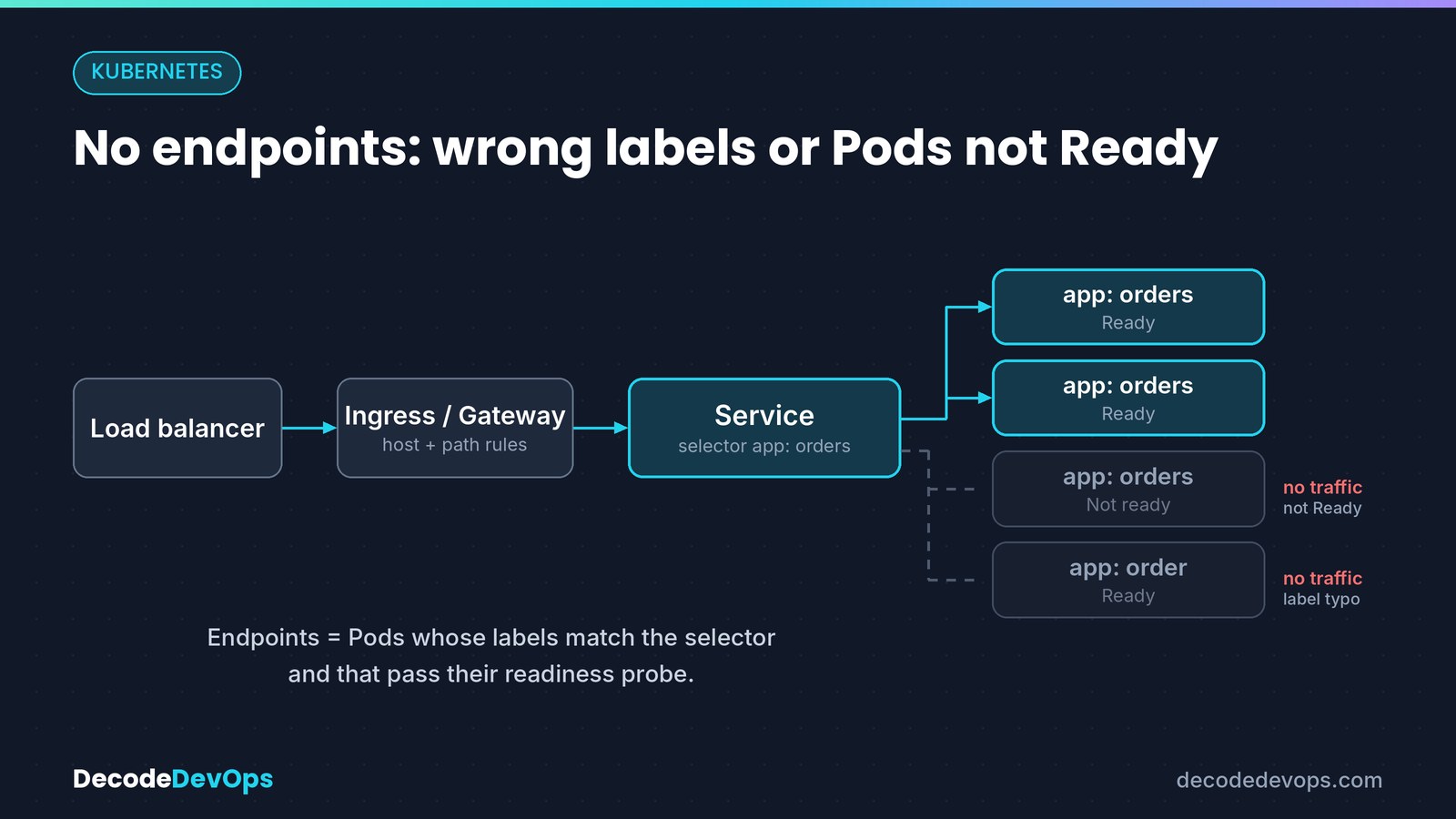
The symptoms#
- Requests to the Service time out or fail with
connection refused. - Your Ingress controller returns
503 Service Unavailable. kubectl describe svcshowsEndpoints: <none>.
$ kubectl describe svc orders
Name:              orders
Namespace:         shop
Selector:          app=orders
Type:              ClusterIP
Port:              http  80/TCP
TargetPort:        8080/TCP
Endpoints:         <none>
<none> means Kubernetes looked for ready Pods with the label app=orders in the shop namespace and found none.
Cause 1: the selector doesn't match the Pod labels#
A Service finds its Pods by label. If one character differs, it selects nothing. Compare the two directly:
kubectl get svc orders -n shop -o jsonpath='{.spec.selector}'; echo
kubectl get pods -n shop --show-labels
{"app":"orders"}
NAME                         READY   STATUS    RESTARTS   AGE   LABELS
orders-api-7c9d8f6b5-x2k4p   1/1     Running   0          5m    app=orders-api,pod-template-hash=7c9d8f6b5
The Service wants app=orders, but the Pods are labelled app=orders-api. Here's what that looks like in YAML:
# Deployment (Pod template)
template:
  metadata:
    labels:
      app: orders-api
---
# Service
spec:
  selector:
    app: orders        # matches nothing
  ports:
    - port: 80
      targetPort: 8080
The fix: change the Service's selector to match the Pods. That's usually safer than changing the Deployment, because a Deployment's spec.selector can't be changed after creation, and its template labels must keep matching it.
kubectl patch svc orders -n shop -p '{"spec":{"selector":{"app":"orders-api"}}}'
Two related traps:
- Namespaces. A Service only selects Pods in its own namespace. Pods with the right labels in another namespace don't count.
- Extra selector keys. Every key in the selector must match. A selector of
app: orders, tier: backendskips Pods that only haveapp: orders.
Cause 2: the Pods exist but aren't Ready#
If the labels match, check readiness. Only Pods that pass their readiness probe receive traffic. If the Pods keep restarting instead, read the CrashLoopBackOff guide first.
$ kubectl get pods -n shop -l app=orders-api
NAME                         READY   STATUS    RESTARTS   AGE
orders-api-7c9d8f6b5-x2k4p   0/1     Running   0          3m
Running with 0/1 ready is the giveaway: the container is up, but its readiness probe is failing. The events show why:
$ kubectl describe pod orders-api-7c9d8f6b5-x2k4p -n shop
...
Warning  Unhealthy  12s (x9 over 2m)  kubelet  Readiness probe failed: HTTP probe failed with statuscode: 503
Common reasons, and their fixes:
| What you see | Likely cause | Fix |
|---|---|---|
connection refused in probe events |
Probe port doesn't match the port the app listens on | Point the probe at the app's real port |
statuscode: 404 |
Wrong probe path | Use the app's actual health path |
statuscode: 503 |
App is up but a dependency (database, cache) isn't | Fix the dependency, or make readiness reflect what the Pod can serve |
| Fails only during startup | App needs longer to start than the probe allows | Add a startupProbe or raise initialDelaySeconds |
You can confirm the Pod is known but not ready in its EndpointSlice, which lists every address and its readiness:
kubectl get endpointslices -n shop -l kubernetes.io/service-name=orders -o yaml
endpoints:
  - addresses: ["10.0.1.12"]
    conditions:
      ready: false
A less common cause: a named targetPort that doesn't exist#
If the Service uses a named port, such as targetPort: http, each Pod must declare a container port with that name. Pods without it are left out of the endpoints.
# Service
ports:
  - port: 80
    targetPort: http     # Pods need a container port named "http"
A wrong numeric targetPort behaves differently: endpoints still appear, but connections fail because nothing listens on that port.
Quick checklist#
| Check | Command | What you want to see |
|---|---|---|
| Endpoints exist | kubectl describe svc <name> |
Pod IPs on the Endpoints line |
| Selector matches labels | kubectl get pods --show-labels |
Every selector key present on the Pods |
| Same namespace | kubectl get pods -n <svc-namespace> |
Pods in the Service's namespace |
| Pods are Ready | kubectl get pods -l <selector> |
1/1 (or n/n) in READY |
| Named port exists | kubectl get pod <pod> -o yaml |
A container port with the name targetPort uses |
The production lesson#
Don't fix a failing readiness probe by deleting it. The Service would then send traffic to Pods that can't serve it, and your users would see the errors instead of Kubernetes. Fix what the probe is telling you, or make the probe check what the Pod can actually serve.
Official documentation#
- Service, Kubernetes documentation: selectors, ports and named targetPorts
- Debug Services, Kubernetes documentation: the official step-by-step for a Service that doesn't work
- EndpointSlices, Kubernetes documentation: how ready and not-ready addresses are tracked
FAQ
What does it mean when a Kubernetes Service has no endpoints?
Kubernetes found no ready Pod that matches the Service's selector, so it has nowhere to send traffic. Either the selector doesn't match any Pod labels, or the matching Pods aren't passing their readiness probe.
Does a wrong targetPort cause a Service to have no endpoints?
A wrong numeric targetPort doesn't: endpoints are still created, and you see connection refused or timeouts instead. A named targetPort that doesn't exist on the Pod is different: that Pod is left out of the endpoints.
How do I see a Service's endpoints?
Run kubectl describe svc <name> and look at the Endpoints line, or kubectl get endpointslices -l kubernetes.io/service-name=<name> to see every address, including Pods that aren't ready.
Practise this
Kubernetes Incident Lab
50 realistic broken clusters on your own laptop. Investigate with your own kubectl; a validator checks the live cluster, so shortcuts don't pass.